

Website builder · Beta

A website built around your business.

Start with your services, prices and hours. Make the site yours. Give visitors a clear path to book.

Website builder · Beta · Hosted on an EstheticSense address

Illustrative visitor website

From your business record to a live site

Start with your business. Make it yours.

Your services, prices, hours and team give the first draft a head start.

  1. Step 1

    Start with a draft.

    Business details, library photos and starter privacy and terms pages. Review them for your business.

  2. Step 2

    Make it feel like you.

    Click to edit words and photos. Compare layouts with your own content, or search for what to change.

  3. Step 3

    Choose what to show.

    Show or hide catalog items. Use website-only names or photos. Coming soon shows an item without letting clients book or buy it.

  4. Step 4

    Review. Then publish.

    Follow the review’s links to anything missing. Check phone layout and, when online booking is available, a Book button before publishing to your EstheticSense address.

When hours change

Keep your site closer to your day.

Illustrative website update

The hub names business details that changed. When only facts such as hours or prices need updating, publish them with one confirmation.

Updates, history and recovery
  • Price corrections and removals for items already live reach the site on their own. Other changes follow their publishing steps
  • New items waiting to appear: see where they’ll show and put them online with one tap
  • If publishing fails, the site stays as it was and you can retry
  • Roll the live site back to a recent version after a safety check; your draft stays
  • Earlier versions to compare and restore to your draft
When a client clicks Book

Give interest a place to go.

Illustrative booking handoff

Take visitors from your website into booking, with the location chosen. Or send them to the booking site you already use.

Booking buttons and locations
  • When nothing can be booked online, buttons become Call to book or Get in touch
  • EstheticSense booking records that visitors came from your website
  • Point buttons to booking, a page, section, phone or email; a Book button can target one treatment or a group
  • A service that needs medical supervision stays off the site until you confirm it; its page offers a consultation
  • More than one location: a Locations page with each address, hours and contact details
How visitors find and contact you
  • Phones, tablets and desktops. The layout adapts to each.
  • Built for search and sharing. A sitemap, sharing cards and local business data built from your facts.
  • Your address, your choice. Show the street address, or only the city with a note that the full address comes with the booking.
  • A contact form that reaches you. Messages go to your Action Center or open the visitor’s own email, with the fields you choose.
See the Website studio in EstheticSense
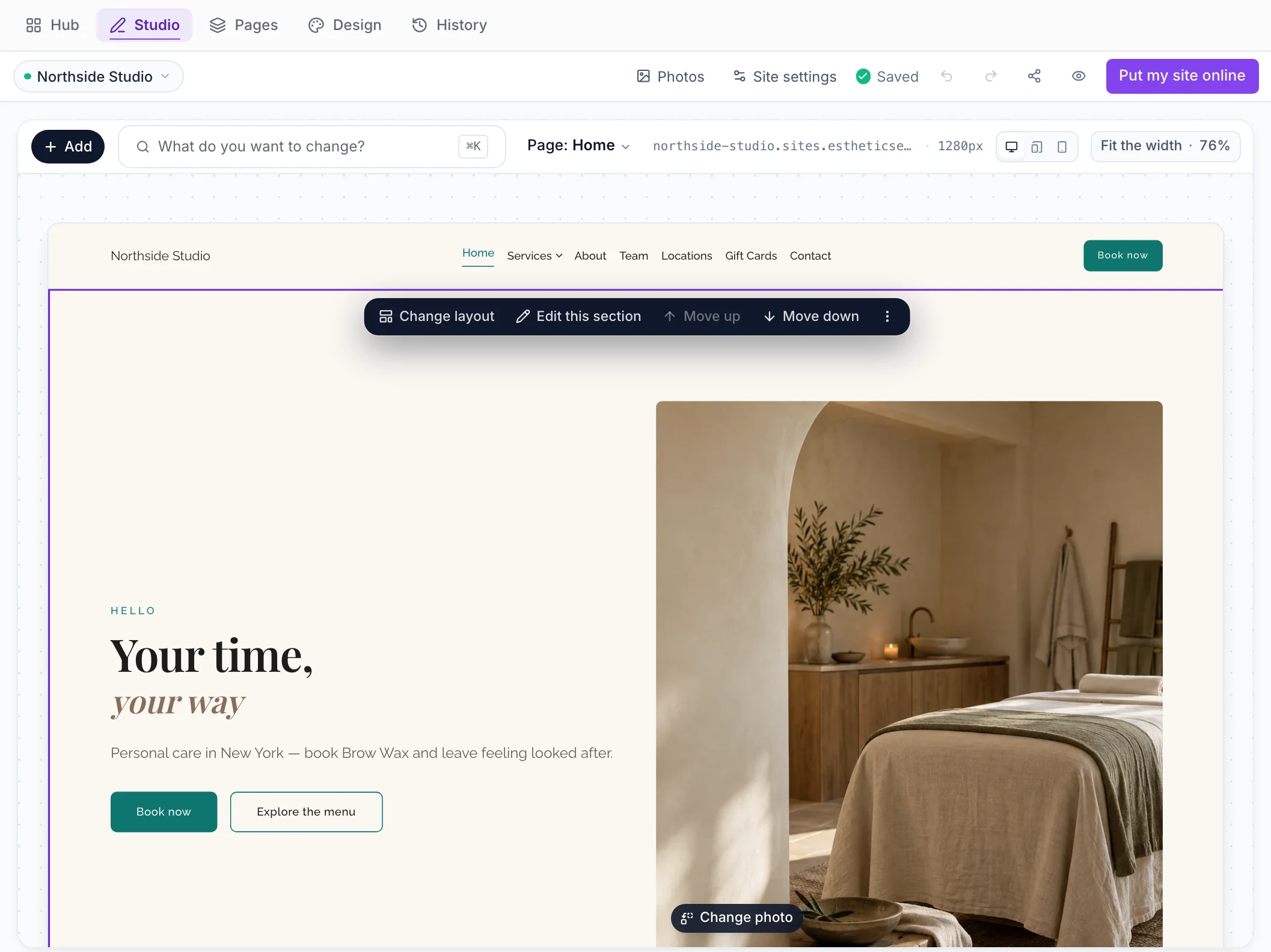
Website › Studio in the EstheticSense staff web app: Northside Studio’s first draft with the home page open on the canvas at desktop width, its welcome banner selected with the section bar (Change layout, Edit this section, Move up, Move down) above the headline “Your time, your way” and the Book now button, and the studio toolbar with Photos, Site settings, Saved and Put my site online.
Open full-size product capture (new tab)
Also included

The rest of the builder.

Grouped by the moment you need it.

Shaping the site
  • One list covers services, packages, memberships, gift cards, promotions, products and team members; show or hide individual items or whole groups
  • Give an item a website-only name, short description or photo, or feature it, without changing the catalog
  • Add a section from previews of exactly what will be inserted, in your brand
  • Move a section up or down
  • See pages at desktop, tablet or phone width; zoom to fit the width, screen or full size
  • Add, rename, reorder, duplicate and delete pages; edit the menu and footer links
  • Compare your site in different looks. If a written section has no place in the new look, keep both, replace it or cancel
  • Colors, fonts, spacing, buttons and photo framing beside a live preview
  • Your brand color from Your Brand, at the next publish
  • Choose which fields the contact form asks for
Before and after publishing
  • After publishing, rolling back or taking the site offline, visitors see that change straight away, never another business’s pages
  • Before first publication, confirm the business facts are yours. Starter privacy and terms pages are shown for recommended review, without requiring a legal signoff
  • Imported items wait for your review and you approve them together
  • See your latest draft as a visitor would, without publishing
  • Share a private draft link that expires on its own, and revoke it whenever you like
  • Take the site offline; your draft, history and settings stay
  • The site runs only its own scripts, sandboxes embeds and strips unsafe code
  • A website card on Home only when something needs you
On your iPhone
  • Manage your website from the iPhone app
  • Your site: private or live, what it still needs, any change waiting
  • Put it online after viewing it at desktop width and, when online booking is available, testing a Book button
  • Fix phone, email and city, choose whether your street address shows, edit About and service descriptions, and choose visible services
  • Take or choose photos for the gallery
  • Copy or share your live address, show a QR code, or send yourself a link for bigger edits on a computer
  • A Your site card on Home only when the site needs you

Before you decide

Switching from another site?

Keep your current site live until this one is ready; your draft is private until you publish.

Plan the switch →
What does it cost?

The website builder is included in the subscription.

See pricing →
Not available yet

Your own domain name and Android are later; separate websites per location are not planned. The draft uses your business record. Some corrections update automatically; other changes wait for your publishing step.

Related Your BrandOnline bookingYour dayCampaigns & promotions

See the workflow

See a business become a website.

Walk through a sample business website: its services, hours, booking route and review before publication. No prep needed.

$19 first provider · $149 maximum per location