

Products & inventory

Keep the shelf ready for the next client.

Track what you sell, what treatments use and what needs ordering. At every location, from the desk or your iPhone.

See the product and stock record
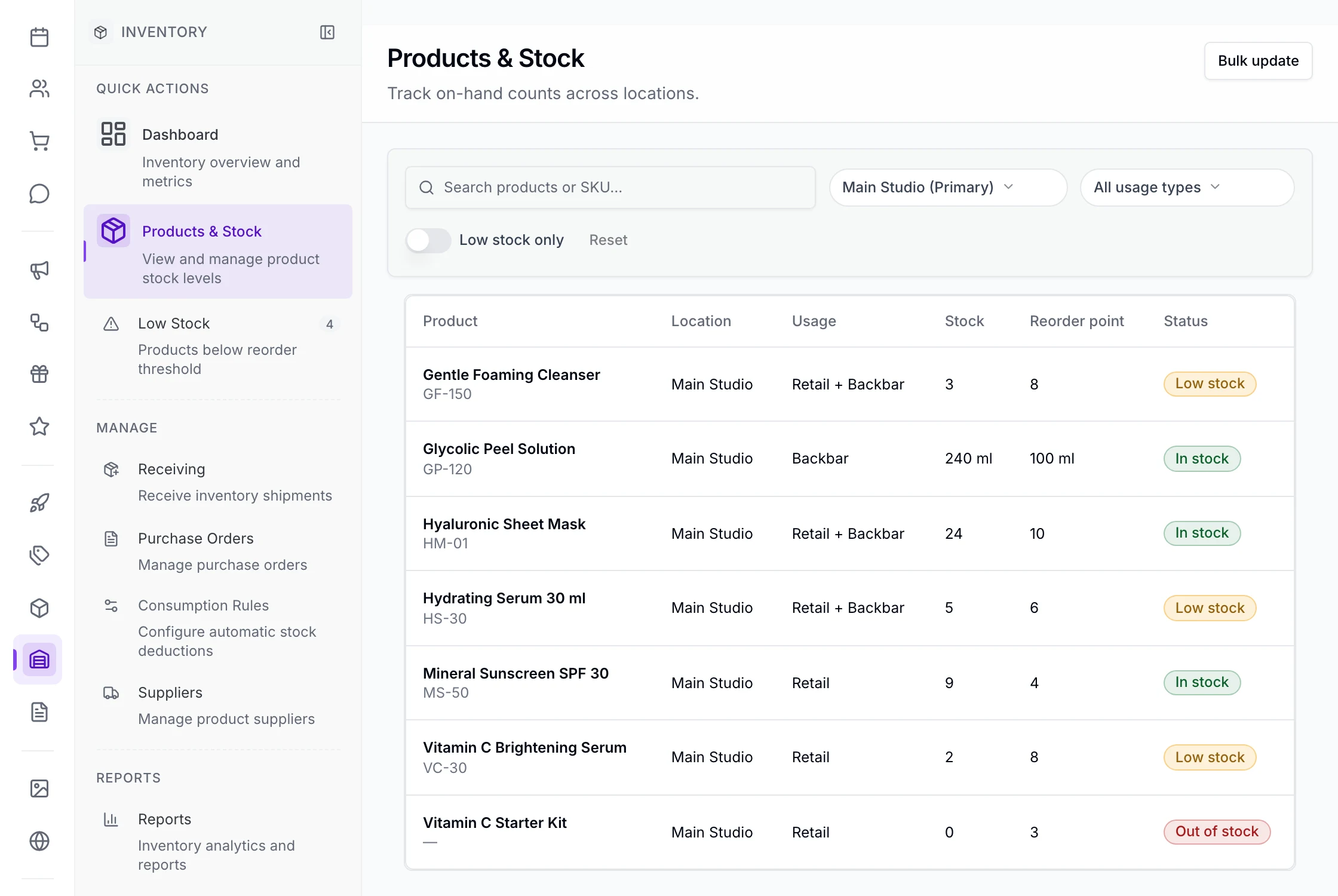
Inventory › Products & Stock at Main Studio: each product with its usage, stock, reorder point and status; the Hydrating Serum 30 ml shows 5 against a reorder point of 6, marked Low stock, and Low Stock in the menu counts 4.
Open full-size product capture (new tab)
One serum, October

Follow the bottle beyond the shelf.

Sold to a client. Used in a treatment. Received from a supplier. Keep each movement in view.

  1. Oct 1

    Counted

    Start with a physical count at the location.

  2. Oct 6

    Sold

    Find it by name, sell at the location’s price. Stock comes off at checkout.

  3. Oct 9

    Used

    Check service use before completing the visit.

  4. Oct 20

    Low

    Low stock appears in the app and daily email.

  5. Oct 20

    Ordered

    Create a draft. Review, submit and send it.

  6. Oct 27

    Received

    Record what arrives against the order.

History, returns and corrections
  • Every change in the product’s history, with who made it
  • Every stock movement for a date range and location, downloadable as CSV
  • Voiding a completed visit puts the products it used back
  • A refund with Return to stock on puts the product back
When a facial uses it

Account for what treatments use.

Illustrative service stock record

Set the products each service uses. Check the amount as you complete the visit, then see that use reflected in stock.

Service stock options
  • See product use by service, location and date range
  • Variable use: the default comes off unless someone changes it
  • Copy another service’s product rules
  • The same rule to many services in one step
  • Retail, back bar, or both, per product
When it runs low

See what’s low. Decide what to order.

Illustrative purchase order workflow

Set your reorder points. When stock runs low, turn the list into draft orders by supplier and location. You review and send them.

Ordering and receiving options
  • Receive a delivery in part or in full, or one product in one step
  • Download an order as PDF or CSV, or cancel one you no longer need
  • Cancel an order you no longer need
  • Turn off Keep selling when it runs out, and a product that has run out cannot be sold
For your team

The right stock view for your team.

  • Owners and managers

    Everything in Inventory.

  • Front desk

    See stock and receive deliveries.

  • Each product, each location

    How much is where, and a reorder point per location where needed.

  • In your own unit

    Count in ml, oz or pieces, including part-units.

Also included

The rest of the shelf.

Grouped by the moment you need it.

Selling products
  • Add a retail product with its name and price, and whether it is tax-free
  • Find it for a sale by typing its SKU
  • Sell more than one on a line
  • A tax-free product is sold without sales tax
  • Product Sales in Reports counts every product sold, less returns
Keeping the numbers
  • What you pay, and an estimated margin at the configured selling price
  • Choose which products you count stock for; each gets a count at every location offering it
  • Keep suppliers and contact details; edit, deactivate or delete them
  • Each product’s supplier
  • Add or take away stock with a reason, such as damaged or expired
  • Update counts and reorder points for many products at once
  • Change quantities on a draft order in the iPhone app before submitting
On your iPhone
  • Inventory in the iPhone app
  • Count, adjust and receive a product’s stock, and see its history
  • Turn low stock into draft orders, then submit, email, cancel and receive them
  • Add and edit your suppliers
  • Add or edit a retail product

Before you decide

Switching from another tool?

Plan the move before anything changes at your business.

Plan the switch →
What does it cost?

Inventory is included in the subscription.

See pricing →
Not available yet

Reordering on its own, transfers between locations, lot numbers and expiry dates, scanning to receive, cycle counts, more than one supplier per product, selling products online and Android are later. Margin is estimated at the configured selling price.

Related Payments & checkoutAnalytics & reportingYour dayMemberships & Packages

Bring your best-selling product

Put your stock in the picture.

Follow a product from delivery to a sale or treatment. See where each stock change comes from.

$19 first provider · $149 maximum per location