

Routines

Keep caring between visits.

Prep before they arrive. Aftercare when they leave. A thoughtful prompt for what comes next.

You review each routine before turning it on. Messages send when their conditions are met.

Illustrative aftercare message · your saved instructions
Around the appointment

A little care at the right moment.

  1. Before the visit

    Help them arrive prepared.

    Send the booked services’ saved prep instructions when the appointment is booked.

  2. After the visit

    Keep your instructions close.

    Send saved aftercare by text when the visit is completed, followed by email.

  3. Time for feedback

    Ask while the visit is fresh.

    Send the Reviews invitation at the time you set after a completed visit.

  4. Time to return

    Give the next visit a gentle prompt.

    Use the service’s return guidance to time an eligible reminder.

Next-visit reminders

Give “see you next time” a next step.

Save the usual return guidance for a service. Completing the visit records the return date; the reminder links to booking with the service and location chosen.

Already booked that exact service? Reminder messages not yet prepared for sending stop. A different service booking does not stop them.

Example reminder journey
Visit completedReturn date recordedEligible reminder

Ready for your next visit?

Find a time that works for you.

Booking link ↗

Marketing consent and sending checks apply.

Before it’s on

Read it. Test it. Then turn it on.

Illustrative routine setup and controls

Choose the purpose, read the messages and timing, then test the configurable routine on yourself or a real appointment before turning it on.

Setup and sending controls
  • Test this exact version—on yourself, for one real appointment, or in a preview that sends nothing—before turning it on. Flows names any remaining blockers
  • Flows checks sending readiness: a ready sender per channel, complete email details and enough texting credits
  • Someone who can set up but not send asks; the person who can send approves that exact version
  • Your own routine: up to three texts or emails when an appointment is booked or completed
  • Limit it to one location or one service
When plans change

Change the plan. Keep the record.

Illustrative routine setup and controls

Pause due messages until you resume. Review timing changes before saving a new version. Edit custom wording, or update saved instructions and invitations at their source.

Overlaps and related settings
  • A second prep, aftercare or review routine covering an overlapping location cannot turn on, even for different services; Flows names the existing routine
  • When a routine for an outcome already exists, Flows offers to manage it
  • From Flows, open the appointment confirmation and reminder settings, and get back
See what happened, visit by visit

See what was sent, held, skipped or failed, and the reason.

  1. Mon · Sent

    Harper Quinn

    Visit completed at 3:25 PM. The aftercare text went then, the email 15 minutes later.

  2. Tue · Skipped

    Lena Brooks

    Appointment cancelled. The routine stopped; nothing went out.

  3. Wed · Skipped · text

    Nora Wells

    No consent for texts of this kind. The email went; the text didn’t.

  4. Thu · Sent · evening

    Theo Grant

    Visit completed at 8:20 PM. Aftercare is about the visit, so it went then; a marketing routine’s text would have waited for allowed hours.

  5. Fri · Failed, then sent

    Camille Ortiz

    The provider refused the text. Maya retried it from the run; it went.

  • Cancelled, voided, no-show or deleted appointments stop their routines. Booking routines never send after the visit starts
  • Retry a failure before the provider accepted it, or deliberately resend after checking the destination
  • See recent activity across routines and filter to what needs attention. Delivered means the provider confirmed it
  • Routine texts go from your business line and use its included texts, then prepaid credits; one that can’t be paid for is not sent
  • When your business reaches a limit on routines, Flows says so and holds the work
Consent, contact limits and client choices
  • Only clients who accept that kind of message. And who haven’t opted out; a marketing message needs marketing consent.
  • Once per visit. Even when the same event arrives twice or the routine is edited in between.
  • In allowed hours. Marketing texts wait for texting hours and your contact limit instead of being dropped.
  • An unsubscribe link on every email. Your business details too; unsubscribing stops further routine emails of that kind.
See the routine list in EstheticSense
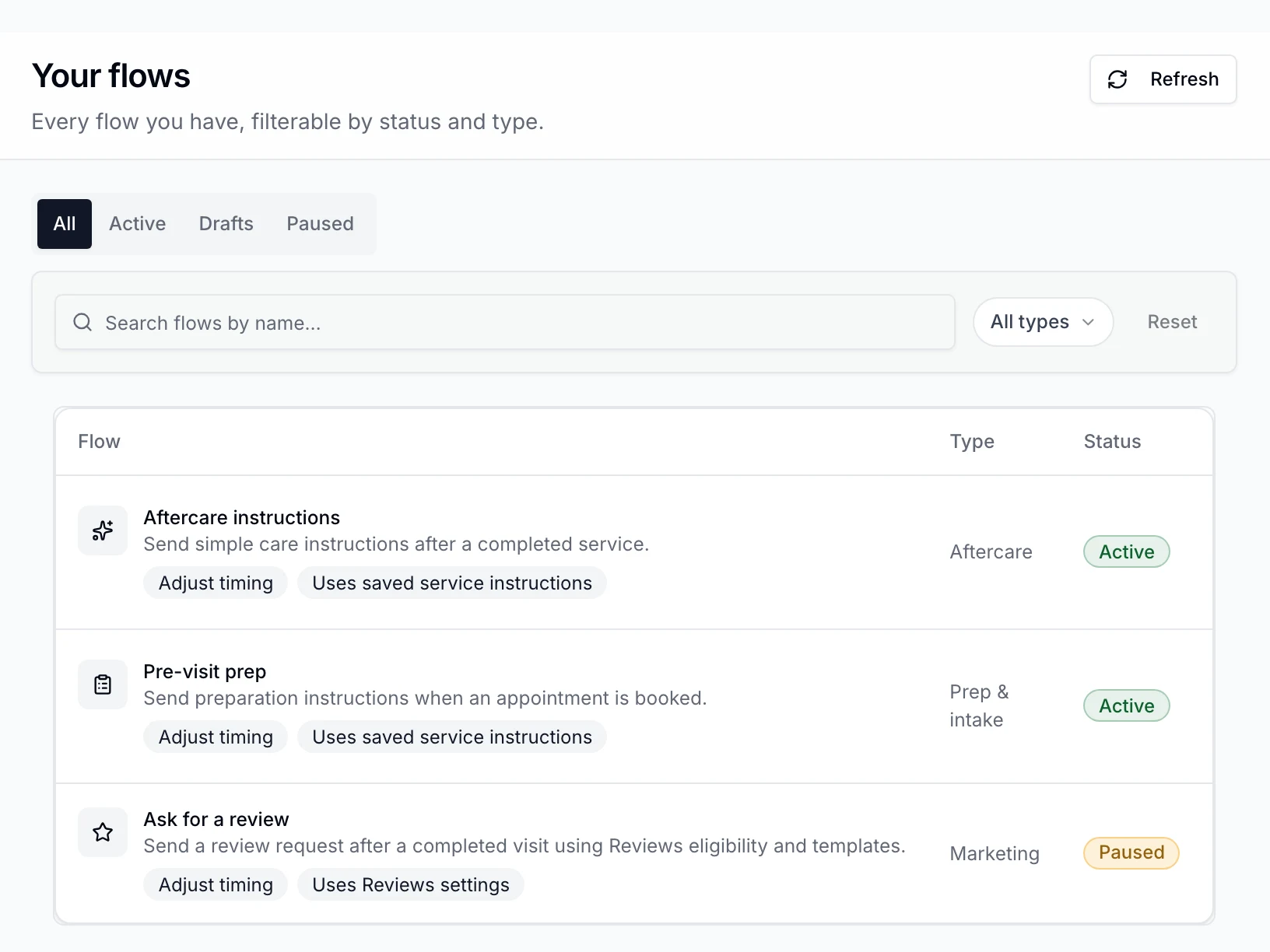
Flows › Your flows in the EstheticSense staff web app at Northside Studio: the list filtered to All, with Aftercare instructions (Aftercare) Active, Pre-visit prep (Prep & intake) Active and Ask for a review (Marketing) Paused, each with its Adjust timing and message-source tags.
Open full-size product capture (new tab)
Also included

The rest of Routines.

Grouped by the moment you need it.

The next visit reminder
  • Set the usual return: repeat the service, book another after a set interval, no usual return, or decide at each visit
  • For a client with a client record, completing a service with return guidance saves a return date from that visit. Later service edits do not move it
  • The reminder window runs from 10 AM on the return date to 10 AM the next day, in the visit location’s time zone
  • One text when the window opens and one email 15 minutes later, each sending only when its own checks pass
  • A booking for the exact recommended service stops any leg not already prepared for sending
  • The reminder links to your booking page with the service and location already chosen, or to your own booking site
  • Only to a client who said yes to marketing by that channel and has not opted out
  • It respects the client’s texting hours, your contact limits and your sending funds, waiting or skipping rather than breaking them
  • Each return date gets at most one text and one email, whatever is retried
  • In English, Spanish or Arabic, following the client’s language, then the location’s, then the business’s
  • Set up return guidance from its card in Flows and review the text and email. Turn on when a sending channel and booking path are ready; checking a client is optional
  • See what one client would get and when, with nothing sent, before and after you turn it on
  • See who is next to be reminded, what happened recently, and which services have a return date
  • Pause it and resume it later
  • Turning on needs sending permission in Flows and access to every location. Checking a client also needs access to that client
  • From its card in Flows in the staff web app
  • Set up, check, turn on, pause and resume it in the iPhone app
Who does what
  • Choose who can view, set up, turn on and retry routines
  • Ask for a review goes out a set time after each completed visit, a day later unless you change it
  • Pre-visit prep texts the booked services’ saved prep when an appointment is booked
  • Aftercare texts each completed service’s saved instructions when the appointment completes, then emails them 15 minutes later
On your iPhone
  • Set up and test routines, turn them on or request activation, change timing, see activity, pause and resume from iPhone

Before you decide

Switching from another tool?

Plan the move before anything changes at your business.

Plan the switch →
What does it cost?

Routines are included in the subscription; routine texts go from your business line and use its included texts, then prepaid credits.

See pricing →
Not available yet

Birthday and win-back routines, form reminders, routines that create tasks for your team, and Android are later. You review each routine before turning it on. Messages send when their conditions are met.

Related Two-way textingReviewsAppointments & calendarCampaigns & promotions

Bring your aftercare sheet

Carry the care beyond the appointment.

Explore prep, aftercare and next-visit follow-up for the services you offer.

$19 first provider · $149 maximum per location