Expenses

Receipts in order.
Spending in view.

Keep receipts, categories and who paid together. Hand your accountant one organized bundle.

Illustrative expense entry
Attach the receipt. Enter the details.
A place for every receipt

Keep the paper trail together.

Capture it while it’s in your hand. Find it when you need it.

  1. 01 · Capture

    Snapped.

    Attach the receipt. Enter the details. Save a draft.

  2. 02 · Organize

    Categorized.

    Use the vendor’s suggested category. Record who paid and what’s reimbursable.

  3. 03 · Split

    Split.

    Divide a receipt across categories. Link an inventory item for context.

  4. 04 · Review

    In view.

    Limit team members to their own expenses. Owners can review them all.

  5. 05 · Hand over

    Ready to share.

    Export a CSV or a bundle with receipt images and a summary PDF.

When the rent comes out again

Rent comes around. The draft is ready.

Illustrative expense record · draft review

Set monthly or yearly repeats for regular expenses. Each cycle creates a draft for your review. Stop the schedule when it ends.

Recurring expense options
  • Ten ready-made categories chosen for beauty businesses
  • Rename, add or remove categories to fit yours
  • The payment method on each expense
When a teammate pays

Keep track of who paid.

Illustrative expense record · draft review

A team member buys supplies on their own card. Record the payer, location and reimbursable flag so the details stay together.

Recording team expenses
  • Log, review and export expenses in the EstheticSense iPhone app
  • A split line can name the inventory item it bought, without changing stock
See the desktop expense list
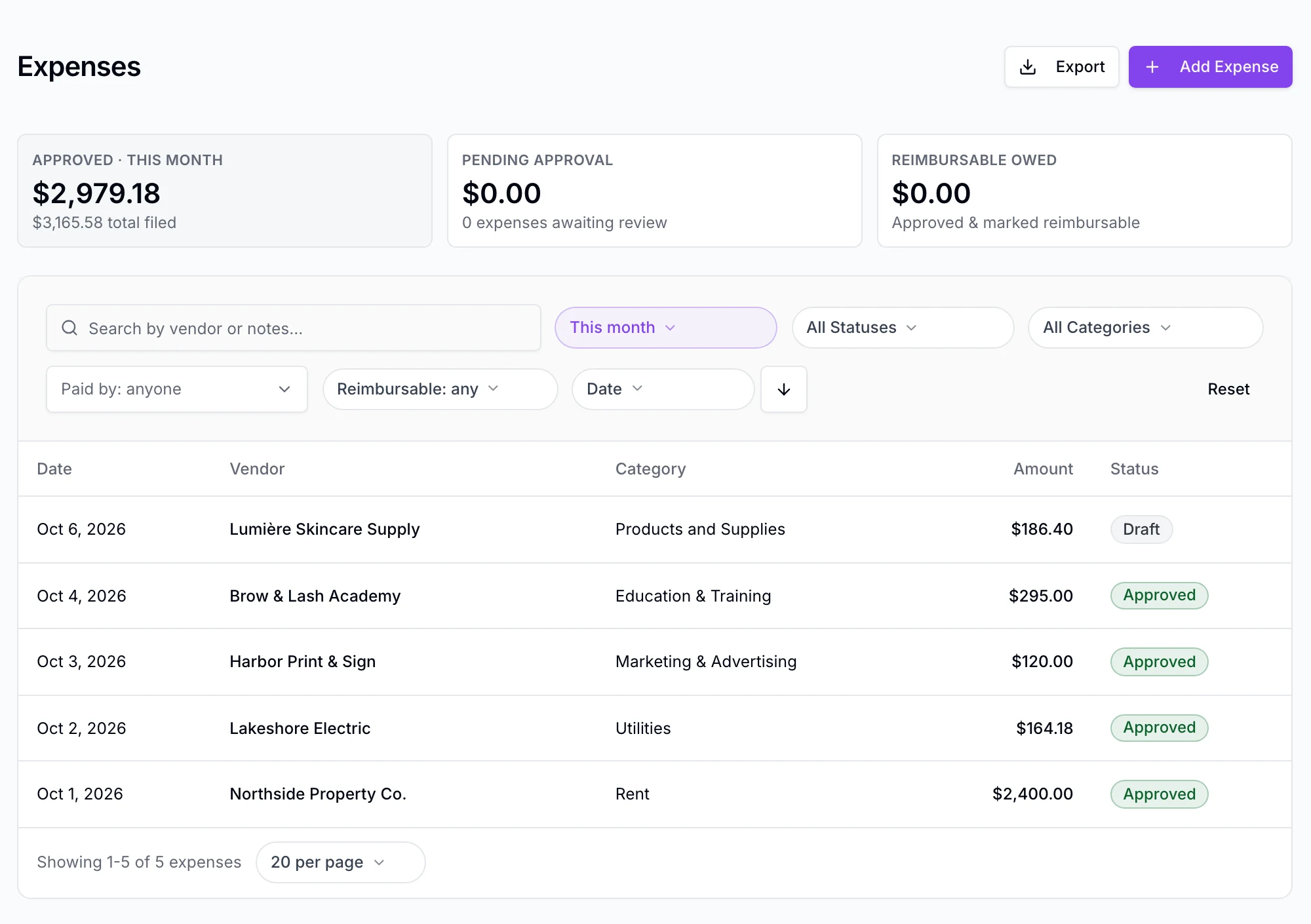
The Expenses list in EstheticSense for October 2026: this month’s approved total and the total filed, the filters set to This month, and Lumière Skincare Supply from Tuesday, Oct 6 at the top as a Draft, above the approved education, marketing and utilities expenses and the rent.

Approval statuses shown in this capture belong to a later release.

Open full-size product capture (new tab)
Also included

The rest of Expenses.

Grouped by the moment you need it.

Recording
  • Vendor, amount, date and category, by hand
  • Upload a receipt image and keep it attached
  • A category suggested from your vendor rules or that vendor’s last expense
  • Split one receipt across two to five categories
Exporting
  • CSV for any dates, downloadable again from export history
  • The accountant bundle: CSV, receipt images and a summary PDF

A few practical answers.

Switching from another tool?

Plan the move before anything changes at your business.

Plan the switch
What does it cost?

Expenses are included in the subscription.

See pricing
Not available yet

Receipts sent in by email, EstheticSense reading a receipt and filling in its details, rejecting an expense and sending it back to the person who submitted it, routing expenses through more than one approver, paying reimbursements out, a bank feed, a link to accounting software, and Android are not part of this release. Expenses records what you enter; it is a tool, not an accountant.


Related Analytics & reportingProducts & inventoryPayments & checkoutTeam & hours

Bring the shoebox

Give every receipt a place.

See how your team can record an expense, keep the receipt and prepare the accountant’s bundle.

$19 first provider · $149 maximum per location